예제 문제:
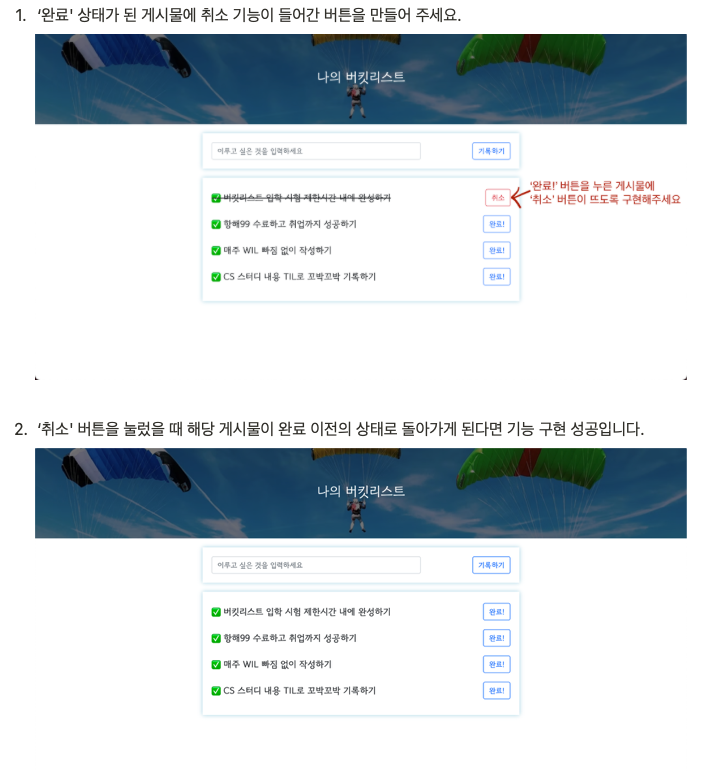
해결 방법
파이썬
//bucket/cancel 로 클라이언트와 연결
//db를 변경하는 기능을 쓰기위해 "POST" 사용
@app.route("/bucket/cancel", methods=["POST"])
def bucket_cancel():
    cancel_receive = request.form['cancel_give']
    //done 값을 '0'으로 재수정해주는 기능 수행
    db.bucket.update_one({'num': int(cancel_receive)},{'$set':{'done':0}})
    return jsonify({'msg': '취소 완료'})
자바스크립트
        function show_bucket() {
            $.ajax({
                type: "GET",
                url: "/bucket",
                data: {},
                success: function (response) {
                    let rows = response['buckets']
                    for (let i = 0; i < rows.length; i++) {
                        let bucket = rows[i]['bucket']
                        let num = rows[i]['num']
                        let done = rows[i]['done']

                        let temp_html = ``
                        if (done == 0) {
                            temp_html = `<li>
                                            <h2>✅ ${bucket}</h2>
                                            <button onclick="done_bucket(${num})" type="button" class="btn btn-outline-primary">완료!</button>
                                        </li>`
                        } else {
                            temp_html = `<li>
                                            <h2 class="done">✅ ${bucket}</h2>
                                            // 취소 버튼 추가 : class="btn btn-outline-danger"응 이용하여 bootstrap에서 디자인을 가져옴
                                            // 클릭하면 cancel_bucket을 실행
                                            <button onclick="cancel_bucket(${num})" type="button" class="btn btn-outline-danger">취소</button>
                                        </li>`
                        }
                        $('#bucket-list').append(temp_html)
                    }
                }
            });
        }
function cancel_bucket(num) {
$.ajax({
type: "POST",
// /bucket/cancel 서버에서 받아옴
url: "/bucket/cancel",
// cancel_give 에 num값을 받아옴
data: { cancel_give:num },
success: function (response) {
alert(response["msg"])
window.location.reload()
}
});
}
실전 문제:
평당 500원 가격표시하기

해결 방법:
자바스크립트
        function show_order() {
            $.ajax({
                type: 'GET',
                url: '/mars',
                data: {},
                success: function (response) {
                    let rows = response['orders']
                    for (let i = 0; i < rows.length; i++) {
                        let name = rows[i]['name']
                        let address = rows[i]['address']
                        let size = rows[i]['size']

                        let temp_html = `<tr>
                                            <td>${name}</td>
                                            <td>${address}</td>
                                            // size를 숫자열로 인식하도록 수정한 후 '평'문자를 밖으로 빼냄
                                            <td>${size}평</td>
                                            // 숫자로 읽히는 siz와 500을 곱하고 '원'문자가 이어서 출력되도록 함
                                            <td>${size * 500}원</td>
                                        </tr>`
                        $('#order-box').append(temp_html)
                    }
                }
            });
        }
html
<body>
<div class="mask"></div>
<div class="order">
    <h1>화성에 땅 사놓기!</h1>
    <h3>가격: 평 당 500원</h3>
    <p>
        화성에 땅을 사둘 수 있다고?<br/>
        앞으로 백년 간 오지 않을 기회. 화성에서 즐기는 노후!
    </p>
    <div class="order-info">
        <div class="input-group mb-3">
            <span class="input-group-text">이름</span>
            <input id="name" type="text" class="form-control">
        </div>
        <div class="input-group mb-3">
            <span class="input-group-text">주소</span>
            <input id="address" type="text" class="form-control">
        </div>
        <div class="input-group mb-3">
            <label class="input-group-text" for="size">평수</label>
            <select class="form-select" id="size">
                <option selected>-- 주문 평수 --</option>
                // value 값을 숫자로만 저장하도록 "10평" 에서 '평'을 빼고 숫자로만 지정
                <option value="10">10평</option>
                <option value="20">20평</option>
                <option value="30">30평</option>
                <option value="40">40평</option>
                <option value="50">50평</option>
            </select>
        </div>
        <button onclick="save_order()" type="button" class="btn btn-warning mybtn">주문하기</button>
    </div>
    <table class="table">
        <thead>
        <tr>
            <th scope="col">이름</th>
            <th scope="col">주소</th>
            <th scope="col">평수</th>]
            // '가격' 열을 추가해줌
            <th scope="col">가격</th>
        </tr>
        </thead>
        <tbody id="order-box">
        </tbody>
    </table>
</div>
</body>
'Hanghae99' 카테고리의 다른 글
| 221110 TIL Chapter 05 함수 두번째시간 (0) | 2022.11.10 |
|---|---|
| 221109 TIL Chapter 05 함수 첫번째 시간 (0) | 2022.11.10 |
| 221108 TIL Chapter 04 반복문 (0) | 2022.11.08 |
| 221108 TIL Chapter 03 조건문 (0) | 2022.11.08 |
| 221107 TIL Chapter 02 자료와 변수 (0) | 2022.11.07 |


